Leveraging ARRAYS in BigQuery for query performance

Senior Data Engineer • Contractor / Freelancer • GCP & AWS Certified
Search for a command to run...

Senior Data Engineer • Contractor / Freelancer • GCP & AWS Certified
No comments yet. Be the first to comment.
Everything you need to work effectively with nested and repeated data in BigQuery — ARRAY, STRUCT, UNNEST, ARRAY_AGG, and related functions.
title: "UNNESTING ARRAYS in BigQuery" seoTitle: "How to UNNEST Arrays in BigQuery: A Practical Guide" seoDescription: "UNNEST in BigQuery expands array columns into individual rows, enabling aggregations and filtering on nested data." datePublished: ...
Here's a useful Dataform concept: pre_operations and post_operations. As the name implies, these represent a set of actions that run before and after the main operation (table, view, or SQL operations

BigQuery has always been a SQL engine for tabular data. Object tables add an interesting twist to that. Instead of rows containing values, an object table gives you one row per file — pointing at da

Query your data lake with warehouse-grade security and performance — without moving a single file.

Ever run a heavy BigQuery SQL query, processed gigabytes of data — and then accidentally closed the tab or forgot to save the results? 😬 Don't re-run it. Your results are still there. BigQuery automa

You can use query parameters in BigQuery hashtag#SQL (now in the console as well!) — but how are they different from variables, and when should you use each? Both parameters and variables act as place

Leveraging your platform functionality goes a long way. When developing data pipelines, besides the functional requirements, we try to optimize for some other important variables, such as cost, resources consumed or runtime. While working with big or complex datasets in BigQuery, I always try a test several approaches to see which one yields a better mix from the above.
Take ARRAYs, for example. They allow us to define one-to-many relationships inside tables while saving up on storage and potentially processing power too.
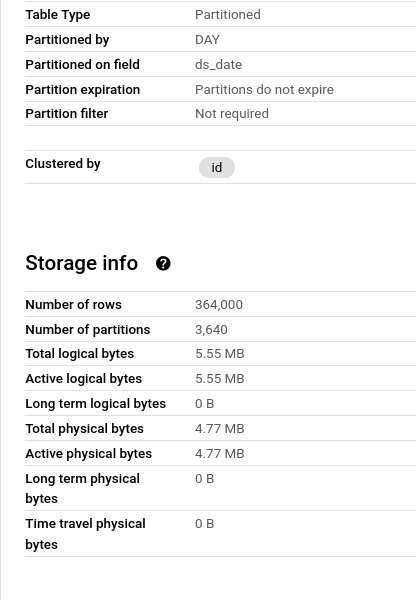
I'll provide a short example. Say we have 100 customers and several thousand dates they visited a website. We could store this in two ways:
- classic approach with one row representing a unique id-date combination
100 ids x 3640 dates each = 364k rows

- leveraging ARRAYs and having one row = one id and its array of dates.
100 ids with an array of 3640 dates each = 100 rows


Let's run a quick query to test the performance of these two. In this particular case, the array example consumes a minuscule fraction of the slot time of the non-array example while still processing only half as many bytes.
I'm definitely not saying this is a "one size fits all" approach, depending of course on data structure, size, querying patterns and other constraints. But whenever you have a challenge like that, it's good to know your options, try out different strategies and pick the one that suits your use case best.
Found it useful? Subscribe to my Analytics newsletter at notjustsql.com.
Enjoyed this? Here are some related articles you might find useful: