
Linting BigQuery SQL with sqlfluff

SQL folks, are you using any linters? Myself, I've used linters such as Pylint for Python, but in the last 3 years, despite working with BigQuery daily, I didn't use one.
First, what is a linter? If you haven't encountered the term before, a linter looks at the code to spot potential errors or bugs, formatting and stylistic issues. It helps enforce the general or custom code guidelines. Think of it as a code reviewer.
Today I'm exploring sqlfluff - a SQL linter. It's a configurable linter that supports, at the time of this writing, two dozen of the most popular SQL dialects, including BigQuery, which we're going to use for today's quick exercise.
We start by installing sqlfluff using pip.
pip install sqlfluffWe can now use the sqlfluff command to analyze our SQL code and even fix some of the problems :).
I've saved the following sample SQL code in a file
CREATE OR REPLACE TABLE learning.base_data (id INT64, dates ARRAY<DATE>)

AS

WITH cte as (

select id FROM UNNEST(GENERATE_ARRAY(1, 100,1)) as id
)
SELECT cte.id,  GENERATE_DATE_ARRAY(DATE('2011-01-01'), CURRENT_DATE(), INTERVAL 1 DAY) as dates

FROM cte
We can now run the sqlfluff lint command, providing the name of the file and the dialect, in our case, BigQuery.
sqlfluff lint test_sql_query.sql --dialect bigqueryThe linter analyzes our code and issues a list of findings. It compares the code to a set of standard, built-in guidelines, which can be overridden or ignored via configuration, based on needs.
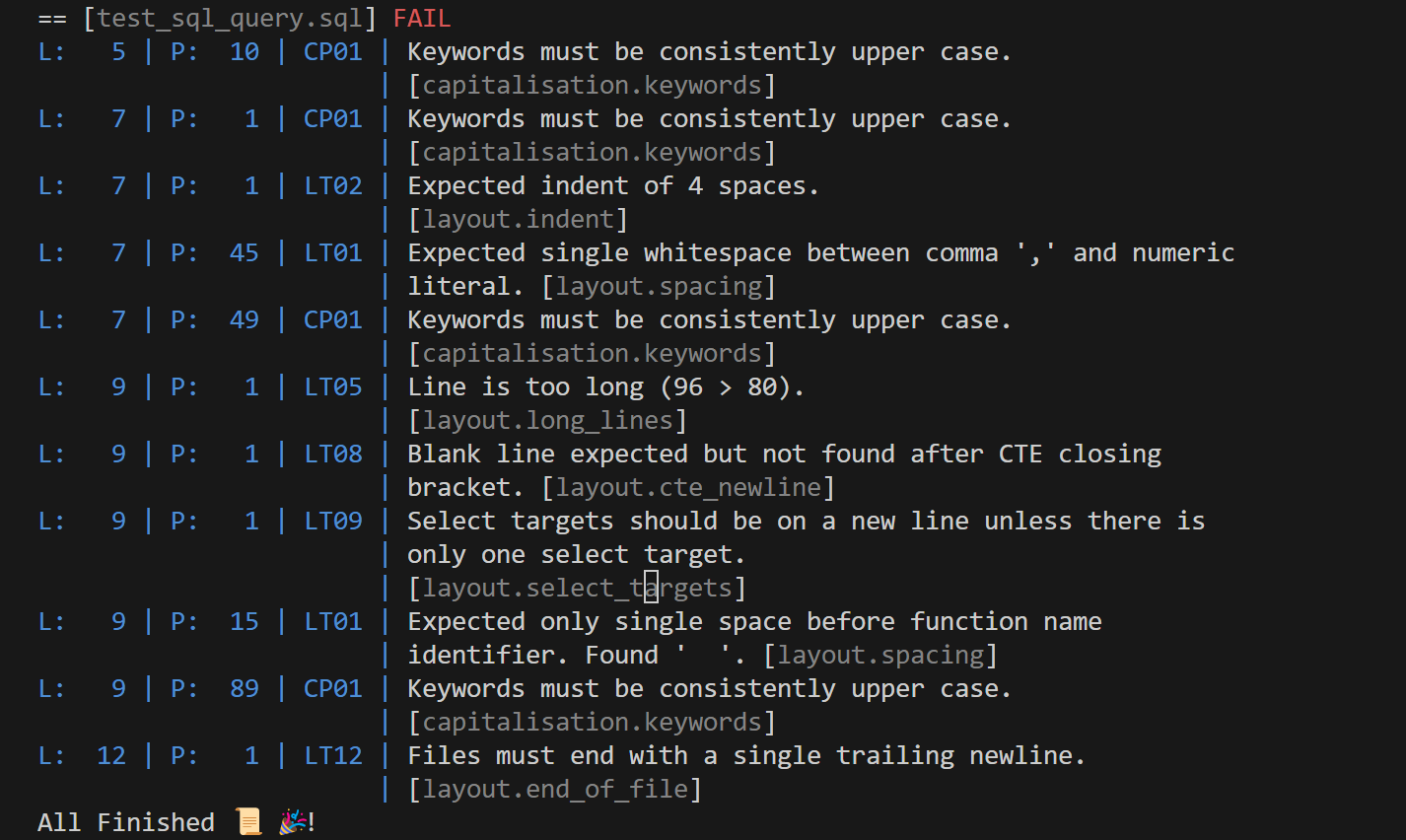
We can also ask sqlfluff to attempt to fix these issues.
sqlfluff fix test_sql_query.sql --dialect bigquery![Terminal output: sqlfluff lists the same violations (CP01, LT01, LT02, LT05 with 95 > 80, LT08, LT09 and LT12), reports 11 fixable linting violations found and asks Are you sure you wish to attempt to fix these? [Y/n].](/images/linting-bigquery-sql-with-sqlfluff/2-output.png)
If we respond Yes, it will apply the proposed fix to the file we provided.
Here's how the file looks now.
CREATE OR REPLACE TABLE learning.base_data (id INT64, dates ARRAY<DATE>)

AS

WITH cte AS (

    SELECT id FROM UNNEST(GENERATE_ARRAY(1, 100, 1)) AS id
)

SELECT
    cte.id,
    GENERATE_DATE_ARRAY(DATE('2011-01-01'), CURRENT_DATE(), INTERVAL 1 DAY)
        AS dates

FROM cte
Another run of sqlfluff lint would yield no issues found.

Configuration
As with other linters, sqlfluff is configurable. You can configure, enable and disable the rules via project-level configuration files. You can also provide in-file configuration directives to override upper-level rules. This would allow you to customize the behavior to your own or your team's and organization's conventions and standards.
Usage in real-life scenarios
I don't know many people who just write SQL in a text file and share it with someone. It's helpful to have your automated peer review to have a look at your code. There is also a plugin for Visual Studio Code that helps make your SQL compliant as you write it, so before it is saved.
A linter brings great value when deployed as part of your project's CI/CD pipeline as a quality control checkpoint. For instance, this could be a pre-commit hook to ensure code standards are upheld. This way, only code that adheres to the standard is merged into the bigger codebase.
What if I use a templating engine like dbt?
A good part of people use a templating provided by something like dbt. Judging by documentation, sqlfluff does support Jinja and dbt templating, but I'm yet to give it a try :).
Next steps
For me, the next step would be trying it out in an actual project, and hopefully use it in production soon.
Thanks for reading and keep enjoying SQL!