
Pay attention to this when UNNESTING in BigQuery

Here's a common confusion that I encounter while working with ARRAYs in BigQuery. This can lead to wrong queries in some situations. Consider the following two snippets:
FROM table,
UNNEST(repeated_column) AS single_item
versus
FROM table
LEFT JOIN UNNEST(repeated_column) AS single_item
They are very different.
In the first, the comma ',' essentially behaves like a CROSS JOIN, pairing each row of the table with every element of the array in its repeated_column.
In the second, we're using a LEFT JOIN, ensuring retention of all rows in the table, even those without a value in the repeated_column.
How is this important, you'll ask. Consider the following case.
Imagine you'd need to compute the number of unique banks a person is a customer of in the example below.

A person can be a customer of one, multiple or no bank at all. This becomes important if a customer has no accounts, using UNNEST joined with the comma (CROSS JOIN) would exclude these entries.
SELECT
  person_id,
  COUNT(DISTINCT bank_account.bank_name) AS count_distinct_banks
FROM input_data,
UNNEST(bank_accounts) AS bank_account

GROUP BY person_id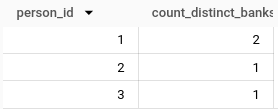
If we want to keep these entries, we'd need to use LEFT JOIN.
SELECT
person_id,
COUNT(DISTINCT bank_account.bank_name) AS count_distinct_banks
FROM input_data

LEFT JOIN UNNEST(bank_accounts) AS bank_account
GROUP BY person_id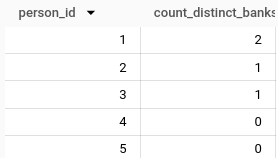
In this case, the first approach would miss out on the people without a bank account, while the second would include them. Quite a big difference in query results if you ask me.
Have fun writing good SQL!
Enjoyed this? Here are some related articles you might find useful: