
Rounding Timestamps in BigQuery

Have you ever encountered a situation where you would need to round a timestamp to the nearest second, 5 seconds or minute? While rounding a number is trivial, it's a little bit less straightforward when dealing with timestamps.
Let's consider the following input data.

We have our event_times that are at milliseconds-level grain. To round the times to the nearest granularity we'd like, we can use a combination of UNIX_MILLIS and TIMESTAMP_MILLIS.
The steps are as follows:
-
Transform the timestamp into milliseconds since Unix epoch (that is, number of milliseconds that have passed since January 1st, 1970) with UNIX_MILLIS
-
Divide that number by your target grain in milliseconds i.e. 1000 for 1 second or 60000 for 1 minute
-
CAST that number to an INT64
-
Multiply that number by your target grain (the number from above) i.e. 1000 for 1 second or 60000 for 1 minute
-
Transform it back to a timestamp using TIMESTAMP_MILLIS
SELECT

event_time,
UNIX_MILLIS(event_time) AS epoch_milliseconds,
TIMESTAMP_MILLIS( CAST(UNIX_MILLIS(event_time) / 1000 AS INT64) * 1000) AS nearest_second,
TIMESTAMP_MILLIS( CAST(UNIX_MILLIS(event_time) / 5000 AS INT64) * 5000) AS nearest_5seconds,
TIMESTAMP_MILLIS( CAST(UNIX_MILLIS(event_time) / 60000 AS INT64) * 60000) AS nearest_1minute,
TIMESTAMP_MILLIS( CAST(UNIX_MILLIS(event_time) / 300000 AS INT64) * 300000) AS nearest_5minutes,

FROM input_data
Upon executing this query, the following results are produced:
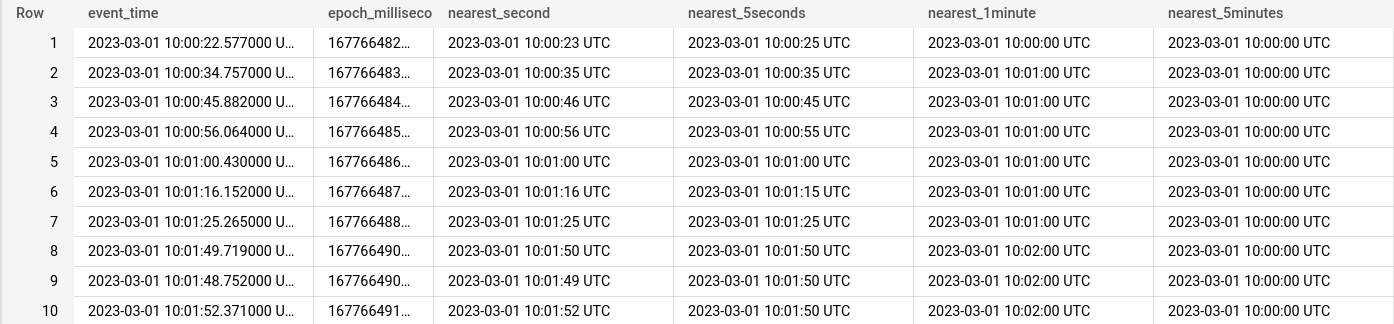
The functions presented above and others relevant to working with timestamps are presented in the documentation.
Thanks for reading and enjoy working with BigQuery!