
Using ANY_VALUE() in BigQUERY

Have you ever used ANY_VALUE in BigQuery?
It's an aggregate function like SUM or AVG, but it returns a non-deterministic (not random) row from the group. I've been using it in scenarios where there's one value anyway, such as when PIVOTing.
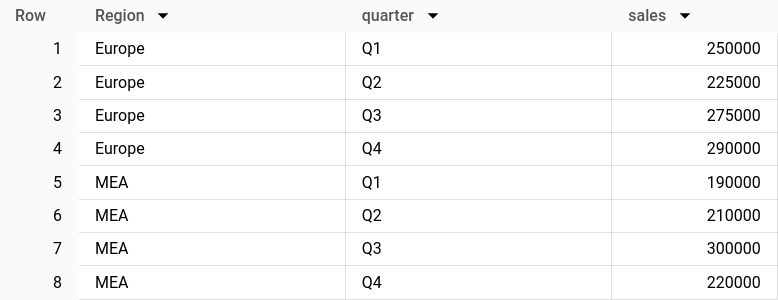
WITH input_data AS (
  SELECT 'Europe' AS Region, 'Q1' AS quarter, 250000 AS sales
  UNION ALL
  SELECT 'Europe' AS Region, 'Q2' AS quarter, 225000 AS sales
  UNION ALL
  SELECT 'Europe' AS Region, 'Q3' AS quarter, 275000 AS sales
  UNION ALL
  SELECT 'Europe' AS Region, 'Q4' AS quarter, 290000 AS sales
  UNION ALL
  SELECT 'MEA' AS Region, 'Q1' AS quarter, 190000 AS sales
  UNION ALL
  SELECT 'MEA' AS Region, 'Q2' AS quarter, 210000 AS sales
  UNION ALL
  SELECT 'MEA' AS Region, 'Q3' AS quarter, 300000 AS sales
  UNION ALL
  SELECT 'MEA' AS Region, 'Q4' AS quarter, 220000 AS sales
)

SELECT * FROM input_data

PIVOT(ANY_VALUE(sales) as sales FOR quarter IN ('Q1', 'Q2', 'Q3', 'Q4'));
Upon documenting myself for this post, I found an interesting thing - it supports the HAVING clause, allowing us to restrict the rows this function is aggregating, either by a MIN or MAX of a given expression.
Let's look at how it works. Say we have the following data:

We're going to compute the product that has sold the highest by value and the product that has sold the least by quantity in each of the countries.
WITH input_data AS (
  SELECT 'Germany' AS country, 'productA' AS product_id, 200 AS quantity, 5.00 AS price
  UNION ALL
    SELECT 'Germany' AS country, 'productB' AS product_id, 75 AS quantity, 100.00 AS price
  UNION ALL
    SELECT 'Germany' AS country, 'productC' AS product_id, 100 AS quantity, 120.00 AS price
  UNION ALL
    SELECT 'Spain' AS country, 'productA' AS product_id, 300 AS quantity, 5.00 AS price
  UNION ALL
    SELECT 'Spain' AS country, 'productD' AS product_id, 250 AS quantity, 20.00 AS price
  UNION ALL
    SELECT 'Spain' AS country, 'productE' AS product_id, 100 AS quantity, 15.00 AS price
)

SELECT
    country,
    ANY_VALUE(product_id HAVING MAX quantity*price) AS highest_selling_by_value,
    ANY_VALUE(product_id HAVING MIN quantity) AS lowest_selling_by_quantity,
FROM input_data
GROUP BY country
Here's what the results would look like:

Thanks for reading!